# Part 4 - The OAuth Authorization Server
Table of Contents
What is an Authorization Server?
The Authorization Server is the central component in the OAuth dance. It is the most critical and the most complex. It’s the trusted middleman making sure users can share their details without exposing their password to the client or the protected resource. As much complexity as possible is moved to the Authorization Server so clients and protected resources can be as simple as possible.
The Authorization Server is responsible for the following:
- Registering clients.
- Authenticating both the user and the client.
- Authorizing clients and making sure the correct permissions are delegated from the user to the client.
- Dispensing Authorization Codes, Access Tokens and Refresh Tokens to clients.
- Introspecting tokens on behalf of its protected resources, and revoking them on behalf of clients and users.
- Publishing its own configuration so clients can find all of the above.
Our Example
Let’s reuse the same example that we have been using from the start.
- Resource Owner: you 🫵, the owner of the Facebook account.
- Client: Strava, the running app that wants to post your workout to Facebook on your behalf.
- Protected Resource: Facebook, the API that holds your account.
- Authorization Server: the component this post is about. It is the one that registers Strava, authenticates you, asks whether you are happy for Strava to post on your behalf, and hands Strava the tokens that Facebook will accept.
In the real world Facebook runs both the protected resource and the Authorization Server. These are two separate roles, that can be in the same program. The company Facebook has a Facebook branded Authorization Server and a private resource which is the actual social media website. For the rest of this post we only care about Facebook the Authorization Server.
The Whole Flow At A Glance
Below is every step of an OAuth flow from beginning to end, seen from inside the Authorization Server, watching what it stores and what it checks at each point.
Client Registration
We will discuss the two most used methods to register a client.
- Static Client Registration.
- Dynamic Client Registration.
Static Client Registration
So far, in previous blog posts, we have been statically registering the OAuth clients in the Authorization Server before the OAuth flow starts. This results in the Authorization Server having a list of pre-approved clients that can authenticate and have user authorizations delegated to them.
Typically an administrator is required to manually register clients to the Authorization Server before any flow can be started.
An Authorization Server asks an administrator for a handful of details before it will register a client. Those details are what let the client authenticate itself, request an Authorization Code, and exchange that code for an Access Token, which is how the user’s authorizations end up delegated to the client.
Here are the details that the Authorization Server asks an administrator to statically register a client:
-
Client type: As discussed, a client can be confidential or public.
-
If the administrator chooses to register a confidential client, then the Authorization Server will generate a
client IDand aclient secretvalue. For example:Terminal window client_id: stravaclient_secret: 8f3e1c02-a9b7-4d6a-9c8b-1e2f4a5d6c7b -
If the administrator chooses to register a public client then only a
client IDvalue will be generated by the Authorization Server and noclient secret. For example:Terminal window client_id: strava
The
client IDandclient secretvalues can be used by the client to authenticate itself when requesting an Access Token from the Authorization Server. -
-
Redirect URIs: It is necessary to provide redirect URIs for a client. The Authorization Server needs to know where to redirect the user after the user has logged in to the Authorization Server and delegated authorizations to the client. The user should then be redirected to the client with the Authorization Code.
-
Grant types: OAuth flows that the client is allowed to use. Currently, in this series we have discussed the Implicit Grant Type and the Authorization Code Grant Type. We will discuss more flows in a future blog post.
-
Scopes: The scopes that the client is allowed to ask for. The Authorization Server will refuse any request for a scope outside this list, and it uses this list to tell the user what authorizations they are being asked to approve. For example, our Strava application needs the
postscope to make Facebook posts on the user’s behalf. -
Audience: In most cases, specifying an Audience is optional. The Audience value can be thought of in contrast to the Scope value. The Scope value defines what the client can do. The Audience value defines which protected resource the Access Token is meant for. In our Strava/Facebook example the Audience value would be
https://api.facebook.com. This is because the Strava client is only ever interested in connecting to Facebook, and no other protected resource.
Static client registration works well for our Strava/Facebook example, since there is exactly one Strava app, and it only ever needs to be registered once.
The client ID, client secret, and redirect URIs belong to the Strava
application itself, so they are identical no matter who is logging in. What
is unique to each individual user is everything the Authorization Server
produces during a flow:
- Consent screen
- Authorization Code
- Access Token
- Refresh Token
These per-user values are all issued against the singular Strava client registered to the Authorization Server.
Dynamic Client Registration
Static Client Registration is the default, but sometimes it can be quite inconvenient. Let’s take Email as another example. A mail provider’s Authorization Server has to let outside applications access a user’s inbox on the user’s behalf, and unlike Strava, there’s no single client app doing that. There could be multiple apps that would want access to the user’s mailbox. A user might connect with Thunderbird, Apple Mail, Outlook, or any of dozens of other email clients, with new ones showing up all the time.
Nobody wants an administrator manually registering every email client that might ever try to connect. That doesn’t scale.
The solution to the above scalability problem is Dynamic Client Registration. It is a way for clients to dynamically register themselves on an Authorization Server that accepts this protocol. Without the need for an administrator to log in to the Authorization Server and manually enter every client.
Dynamic Client Registration is done by the Authorization Server which
exposes a registration endpoint, normally called /register. The actual
path is not fixed by the spec. A client discovers it from the Authorization
Server’s metadata document, published under the registration_endpoint
field. The client itself sends a request to this endpoint describing what
it needs, instead of an administrator filling out a form on the
Authorization Server to statically register a client.
POST /register HTTP/1.1Host: auth-serverContent-Type: application/jsonAccept: application/json
{ "client_name": "Superhuman", "redirect_uris": ["https://superhuman.com/callback"], "grant_types": ["authorization_code"], "response_types": ["code"], "token_endpoint_auth_method": "client_secret_basic", "scope": "read_email"}For example, Superhuman syncs a user’s mail
through its own backend servers rather than reading it directly on the
user’s device, so it registers as a confidential client. Note the
token_endpoint_auth_method of client_secret_basic, which tells the
Authorization Server that this client intends to authenticate itself with a
secret, in the same Authorization: Basic header the client used when
requesting an Access Token.
The Authorization Server responds with a client ID and, since this is a
confidential client, a client secret.
Here is a successful response from the Authorization Server following a dynamic client registration request:
HTTP/1.1 201 CreatedContent-Type: application/jsonCache-Control: no-store
{  "client_id": "5b6f2a91-8c3d-4e7f-a1b2-9d0e6f4c8a72",  "client_secret": "f4a7c9e2-1d6b-4a8f-9c3e-7b2d5f8a0c14",  "client_id_issued_at": 1755561543,  "client_secret_expires_at": 0,  "client_name": "Superhuman",  "redirect_uris": ["https://superhuman.com/callback"],  "grant_types": ["authorization_code"],  "response_types": ["code"],  "token_endpoint_auth_method": "client_secret_basic",  "scope": "read_email"}
Whenever a client secret is issued, the Authorization Server must also
return client_secret_expires_at. A value of 0 means the secret never
expires. Any other value is a timestamp after which the client has to
register again or rotate its secret.
The client can then use this client ID (and client secret, if it
registered as confidential) to further communicate with the Authorization
Server, for example, to request an Access Token.
Authorization Server Metadata
By now we have named a fair number of endpoints across this entire blog
series: /authorize, /token, /register, and the /introspect endpoint
from the
Protected Resource post.
None of those paths are fixed by the spec. They are conventions, and every
Authorization Server is free to pick its own.
There would be a problem if every client had to be told each path by hand. The solution is a metadata document, defined in RFC 8414, that the Authorization Server publishes at a well-known location:
GET /.well-known/oauth-authorization-server HTTP/1.1Host: auth-serverAccept: application/jsonThe Authorization Server answers with a plain JSON document describing itself:
{ "issuer": "https://auth-server", "authorization_endpoint": "https://auth-server/authorize", "token_endpoint": "https://auth-server/token", "registration_endpoint": "https://auth-server/register", "introspection_endpoint": "https://auth-server/introspect", "revocation_endpoint": "https://auth-server/revoke", "scopes_supported": ["post", "read_email"], "response_types_supported": ["code"], "grant_types_supported": ["authorization_code", "refresh_token"], "token_endpoint_auth_methods_supported": ["client_secret_basic", "none"], "code_challenge_methods_supported": ["S256"]}Everything a client needs is in there. Where to send the user, where to exchange the code, where to register itself, which scopes exist, and which grant types the server supports.
A client only has to be configured with one value, the issuer URL, and
it can discover the rest. The client builds the metadata URL out of the
issuer it was given, so a client configured with issuer
https://auth-server fetches
https://auth-server/.well-known/oauth-authorization-server.
When the response comes back, the response’s issuer field must be
identical to the issuer the client started with: https://auth-server.
Every endpoint inside the metadata response from the Authorization Server
is an absolute URL that can point anywhere. A document served from
auth-server that claimed "issuer": "https://evil-server" would be one
server speaking on behalf of another. A client that skipped the check would
happily send the user, the Authorization Code, and its client secret to
whatever token_endpoint that document listed.
The Authorization Endpoint
At this stage we will assume that the client is registered on the Authorization Server and an OAuth flow has started. Keeping with our Strava/Facebook example: the user has accessed Strava, and is now redirected to the Authorization Server.
The Authorization Server exposes an endpoint (typically named /authorize)
to accept these redirected users. The redirect flow was discussed in the
OAuth Client deep-dive blog,
where an example was given using the /authorize endpoint.
Before the Authorization Server shows the user anything, it validates the incoming request against what was stored during client registration:
- Is the
client_ida client it knows about? - Does the
redirect_uriexactly match one of the redirect URIs registered for that client? - Is the requested
response_type(code) correspond to a grant type the client is allowed to use? - Are the requested scopes a subset of the scopes the client registered?
The redirect_uri check has to happen first, and it has to be an exact
string match. If the client_id is unknown or the redirect_uri doesn’t
match, the Authorization Server must not redirect the error back. Doing
so would turn it into an open redirector for an attacker. It has to render
the error on its own page instead. For every other failure, the error is
returned to the registered redirect URI as an error query parameter,
along with the state the client sent in. The client needs that state
back to tie the failure to the session that started it, exactly as it would
on success.
Once the request is valid, the user is prompted to authenticate. Although there are stages in OAuth 2.0 that require the user to be authenticated, the spec deliberately says nothing about how that should be done, or how the client would learn who the user is. That gap is what OIDC fills by sitting on top of OAuth 2.0, which will be discussed in another blog post.
The Consent Screen
The entire OAuth flow exists to ask one question: is the user comfortable letting Strava post to Facebook on their behalf? This is typically what that screen looks like after the client intially redirects the user to the Authorization Server:
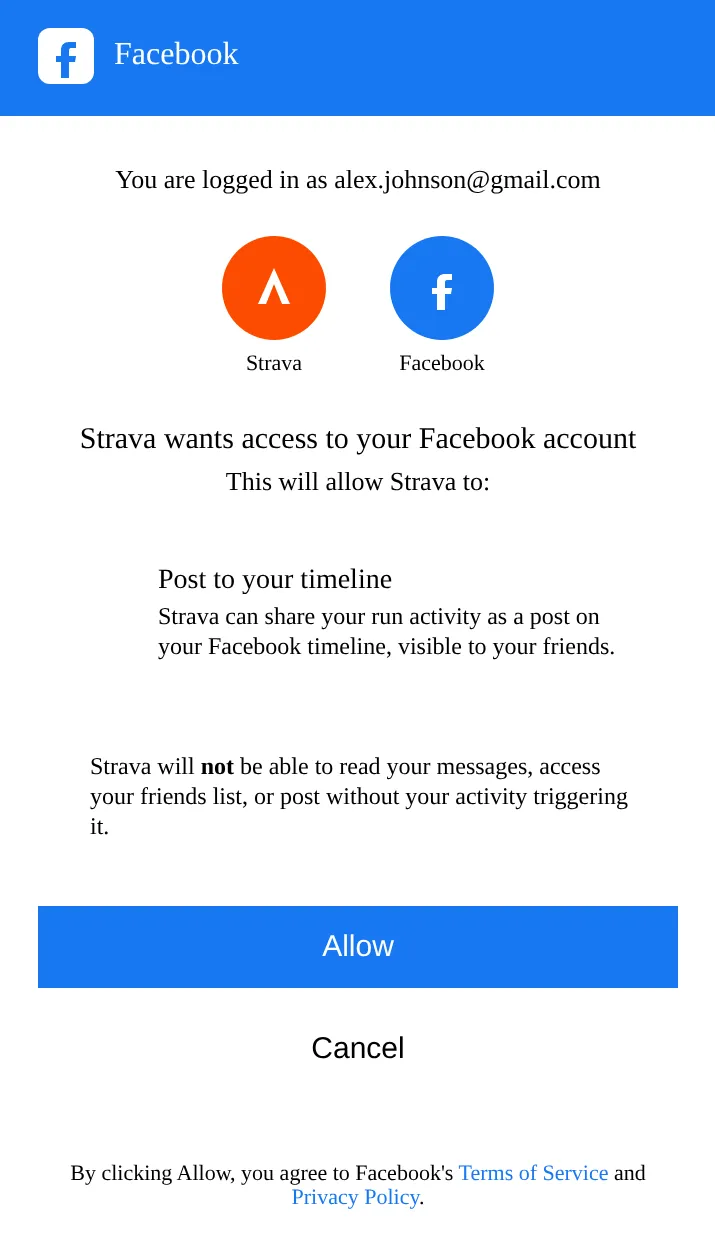
Once the user approves this message, the user will officially delegate their authorizations to Strava. In this case, Strava will now have permissions to make a Facebook post on the user’s behalf.
After approval the Authorization Server will generate an “Authorization Code” for Strava. This will be included in the response when the user is redirected back to Strava.
Here is an example of an HTTP call with the user getting redirected back to Strava with the Authorization Code:
HTTP/1.1 302 FoundLocation: https://strava.com/callback?code=8V1pr0rJ&state=af0ifjsldkjVary: AcceptContent-Type: text/html; charset=utf-8Content-Length: 0Connection: keep-aliveNotice the state parameter
coming back alongside the code. The Authorization Server never interprets
this value. It simply echoes back, byte for byte, whatever the client sent
on the way in, so that the client can compare it against what it stored and
reject the callback if it doesn’t match. An Authorization Server that
silently drops state breaks the client’s only defence against the
CSRF attack we simulated in
the previous post.
The Authorization Code is saved in the Authorization Server’s database. This is because the next stage in the OAuth dance is for Strava to request an Access Token. The Authorization Server must compare the saved Authorization Code to the one that Strava will send (along with the client ID and secret) when requesting an Access Token.
Concretely, at this point the Authorization Server is holding two records. The first record was written when the client was registered, and outlives every OAuth flow:
{ "client_id": "strava", "client_secret": "8f3e1c02-a9b7-4d6a-9c8b-1e2f4a5d6c7b", "redirect_uris": ["https://strava.com/callback"], "grant_types": ["authorization_code", "refresh_token"], "scopes": ["post"]}The second record was written just now, when the user clicked Allow, and belongs to this one flow only:
{ "code": "8V1pr0rJ", "client_id": "strava", "sub": "hamza", "scope": "post", "redirect_uri": "https://strava.com/callback", "code_challenge": "E9Melhoa2OwvFrEMTJguCHaoeK1t8URWbuGJSstw-cM", "code_challenge_method": "S256", "expires_at": 1755562143, "used": false}The code_challenge and code_challenge_method in that record belong to
PKCE, which we cover further down. Ignore them for now.
We will discuss the token endpoint next, where the client will request an Access Token. Every check the token endpoint is about to run is a comparison against those two records.
The saved Authorization Code is short-lived and single-use. The spec recommends a maximum lifetime of ten minutes, and once a code has been exchanged for an Access Token the Authorization Server must reject any further attempt to use it. If a code that has already been redeemed shows up again, that is a strong signal it leaked, and the Authorization Server should revoke the Access Token it previously issued for that code.
The Token Endpoint
At this stage we can assume that the user has delegated their authorizations to Strava. This means that Strava is now able to make a Facebook post on the user’s behalf. Strava has an Authorization Code that was received from the Authorization Server when the user was redirected back, and now Strava needs an Access Token.
We already saw what the client needs to do in order to request an Access Token. Let’s take a look at what happens from the perspective of the Authorization Server.
As mentioned, in order for the client to request an Access Token, it
typically needs to make a call to the /token endpoint. Here is an example
of an incoming HTTP request that the Authorization Server needs to deal
with:
POST /token HTTP/1.1Host: auth-serverAccept: application/jsonContent-type: application/x-www-form-urlencodedAuthorization: Basic c3RyYXZhOjhmM2UxYzAyLWE5YjctNGQ2YS05YzhiLTFlMmY0YTVkNmM3Yg==
grant_type=authorization_code&redirect_uri=https%3A%2F%2Fstrava.com%2Fcallback&code=8V1pr0rJ
The Authorization: Basic header here is just
strava:8f3e1c02-a9b7-4d6a-9c8b-1e2f4a5d6c7b base64-encoded, which is the
client ID and client secret the Authorization Server handed out at
registration. Before it issues anything, the Authorization Server checks
all of the following:
- The
client IDandclient secretare valid. - The Authorization Code (
code) matches an Authorization Code it saved earlier, and that code has not expired or already been used. - The code was issued to this same client. A code handed to Strava cannot be redeemed by any other client, even a correctly authenticated one.
- The
redirect_urimatches the one used in the original/authorizerequest.
There is one more check that belongs in that list. The check for PKCE. We get to it further down.
If everything checks out, the Authorization Server marks the code as used and responds with an Access Token:
HTTP/1.1 200 OKDate: Fri, 31 Jul 2026 21:19:03 GMTContent-type: application/jsonCache-Control: no-store
{  "access_token": "987tghjkiu6trfghjuytrghj",  "token_type": "Bearer",  "expires_in": 3600,  "refresh_token": "j2r3oj32r23rmasd98uhjrk2o3i",  "scope": "post"}
Cache-Control: no-store is required on every token response. Without it a
browser sitting in the network path is free to keep a copy of the Access
Token on disk.
The scope is echoed back because the Authorization Server is allowed to
grant less than the client asked for. If the user unticked a permission
on the consent screen, this is where the client finds out.
Notice how expires_in is only an hour. It is best practice to give Access
Tokens short lifespans.
Issuing Refresh Tokens
We met the Refresh Token from the client’s side in
Part 2. When the Access Token dies,
the client would send the Refresh Token to the /token endpoint from the
Authorization Server and get a new one. Let’s look at this from the
perspective of the Authorization Server now.
An Access Token is deliberately short-lived. This is why the protected
resource checks the exp on
every single request,
and an hour is a typical lifetime of an Access Token. Without Refresh
Tokens the user would be bounced back to the consent screen every hour,
which nobody would tolerate. The Refresh Token is the Authorization
Server’s record that this user already consented, so it can mint new Access
Tokens without asking again.
Here is the client coming back to the Authorization Server an hour later, when the Access Token expires, and using a Refresh Token to request a new Access Token:
POST /token HTTP/1.1Host: auth-serverAccept: application/jsonContent-type: application/x-www-form-urlencodedAuthorization: Basic c3RyYXZhOjhmM2UxYzAyLWE5YjctNGQ2YS05YzhiLTFlMmY0YTVkNmM3Yg==
grant_type=refresh_token&refresh_token=j2r3oj32r23rmasd98uhjrk2o3i&scope=post
The Authorization Server runs a very similar set of checks to the ones it ran on the Authorization Code:
- The Refresh Token exists, has not expired, and has not been revoked.
- It was issued to this same client. Strava cannot refresh a token that belongs to somebody else’s client.
- The requested
scopeis the same as, or narrower than, what the user originally consented to. A client can ask for less on a refresh, never more. - The underlying consent is still standing. If the user has since disconnected Strava from their Facebook account, the Refresh Token dies with it.
The Authorization Server issues a fresh Access Token if all of the above is still true.
Here is an example successful response from the Authorization Server:
HTTP/1.1 200 OKContent-type: application/jsonCache-Control: no-store
{  "access_token": "IqTnLQKcSY62klAuNTVevPdyEnbY82PB",  "token_type": "Bearer",  "expires_in": 3600,  "refresh_token": "8kNq2vXpL4mZ7wRt1yHb3cJd6fGs0aVe",  "scope": "post"}
Notice that the refresh_token came back different from the one that
was sent. This is called refresh token rotation. The old Refresh Token is
invalidated the moment it is used, and the client is expected to store the
new one.
The detection works exactly like the Authorization Code replay we described earlier. If a Refresh Token that has already been rotated away shows up again, there are only two possible explanations:
- The client failed to store the new one.
- Somebody stole the old one.
The Authorization Server cannot tell which, so it assumes the worst and revokes the entire token family, every Access Token and Refresh Token descended from that original consent. The legitimate client is forced back through the full flow, and the hacker gets nothing.
Token Revocation
Because Refresh Tokens can outlive the browser session by weeks, the
Authorization Server also needs a way to throw them away on demand. The
revocation_endpoint in the metadata document is how a client does
that, handing back a token it no longer needs, for example when the user
logs out of the client. The Access Token dies, and the next introspection
call from the protected resource comes back with
active: false.
PKCE
Since the start of the blog series we assumed that our OAuth client, Strava, is a confidential client. What if it were a public client? If Strava just has a client ID with no client secret, how does Strava successfully authenticate to the Authorization Server and grab an Access Token?
Strictly speaking, the public client is still able to grab an Access Token from the Authorization Server without authentication. The OAuth specification allows for that.
Even with the Authorization Server accepting unauthenticated requests from the client to get an Access Token, there is still some level of safety.
Click to reveal the answer
- The redirect URIs for a specific client (even public clients) are already
registered. A
client IDis public, so nothing stops an attacker from starting a flow with Strava’s, but the Authorization Server will only ever send the Authorization Code to a redirect URI Strava registered. The attacker cannot point it at themselves. - You still need an actual user to authenticate on the Authorization Server in order to delegate authorizations to the client. The attacker does not know the user’s username and password.
- Bonus answer: We discussed previously about using the state parameter to guard against CSRF attacks. This would also help the public client.
Even though these safety primitives exist for public clients, an attacker can still get through. The solution is PKCE (Proof Key for Code Exchange)!
Let’s walk through a concrete example where public clients can be compromised if PKCE is not used:
Authorization Code Interception
Let’s revise a few terms, so the example is clear:
-
Redirect URI: the full address the Authorization Server sends the user back to once they have approved, with the Authorization Code attached. We have been using
https://strava.com/callbackall post. -
Private-use URI Scheme: a private-use scheme is what a single app in your operating system would claim for itself, so that the operating system launches that app instead. Unlike
httpswhich is a public scheme. For this example the scheme used for private use will becom.strava.app:/callback. This does not need to be registered to the Authorization Server since it is only meant to help the operating system route calls to specific apps. -
Callback: this is the path at the end,
/callback. The name is a convention and nothing more./oauth2redirectwould do the same job.
Since the definitions are now clear, let’s set the scene for the example:
We will assume that Strava is a public mobile app, and therefore a public
client. A mobile app has no web server to receive a redirect, so instead it
claims a private-use URI scheme with the operating system:
com.strava.app:/callback
Nothing stops a second app on the same device from claiming
com.strava.app too, and when two apps claim one scheme, the operating
system simply picks one.
- The user accesses Strava and gets redirected to the Authorization Server.
- The user logs in to the Authorization Server.
- The user gets redirected back to
com.strava.app:/callback, but the operating system hands that redirect to the malicious app instead. Strava sits on a spinner, stuck at the prelogin screen, because it never received the Authorization Code. - The user simply refreshes Strava to start the OAuth flow again. But now the malicious app is holding a legitimate Authorization Code!
- The malicious app sends a POST request to the Authorization Server to get an Access Token.
Authorization Code Injection
- The attacker somehow obtains a code issued to the victim for this client, just as in the previous example.
- The attacker, in their own browser, starts a normal login at the client. They get a legitimate authorization request and their own state.
- At the redirect step, instead of letting their own code come back, they replace the code parameter with the victim’s, keeping their own state intact.
- The client sees a valid state for its own session, so it proceeds. It POSTs to the token endpoint with its client_secret and the victim’s code.
- The Authorization Server validates the secret (correct), validates the code (correct, issued to this client), and returns the victim’s tokens.
- The client establishes a session, in the attacker’s browser, for the victim’s account.
PKCE flow
The solution for an authorization code interception attack, and an authorization code injection attack is PKCE (Proof Key for Code Exchange) defined in RFC 7636.
A public client has no secret at all, and a confidential client’s secret only proves which client is redeeming a code, never which authorization request that code came from. To fix this problem, each client invents a brand new secret for every single flow, and proves it knows that secret when it redeems the Authorization Code.
The client (whether public or confidential) would generate a random string. The client will then be tasked to prove it knows that randomly generated string when it receives the Authorization Code.
Let’s see this in action:
- The user accesses the client.
- Before redirecting the user to the Authorization Server, the client
generates a large random string called the
code_verifier, and keeps it to itself. - It hashes that value with SHA-256 and base64url-encodes the result. That
is the
code_challenge. - The user is redirected to the Authorization Server and the client sends
only the
code_challengein the same HTTP request. Thecode_verifierstays with the client and never travels the front channel. It stays within the user’s device for now. - The user authenticates with the Authorization Server and approves the client.
- The Authorization Server stores the
code_challengenext to the Authorization Code it generates. - The Authorization Server redirects the user back to the client with the
newly generated Authorization Code, exactly as before. The
code_challengeis not sent back. It stays in the Authorization Server’s record. - The client takes the Authorization Code and directly requests an Access
Token. This time sending the
code_verifier. - The Authorization Server hashes the
code_verifierwith SHA-256 and base64url-encodes it, just as the client initially did in step 3. It then compares the result to the storedcode_challenge. If there is a match then it will generate an Access Token and respond back to the client with the Access Token.
In step 4 above, the /authorize endpoint in the Authorization Server
picks up two new parameters:
GET /authorize?response_type=code&scope=post&client_id=strava-mobile&redirect_uri=com.strava.app%3A%2Fcallback&state=af0ifjsldkj&code_challenge=E9Melhoa2OwvFrEMTJguCHaoeK1t8URWbuGJSstw-cM&code_challenge_method=S256 HTTP/1.1Host: auth-serverThe Authorization Server files that code_challenge away with the code.
When the client returns to the token endpoint, it proves itself by handing
over the original value, as described in step 8:
POST /token HTTP/1.1Host: auth-serverContent-type: application/x-www-form-urlencoded
grant_type=authorization_code&redirect_uri=com.strava.app%3A%2Fcallback&client_id=strava-mobile&code=8V1pr0rJ&code_verifier=dBjftJeZ4CVP-mB92K27uhbUJU1p1r_wW1gFWFOEjXk
Note that there is no Authorization: Basic header here, because a public
client has nothing to put in it. The code_verifier is doing that job
instead.
The Authorization Server computes BASE64URL(SHA256(code_verifier)),
compares it against the stored code_challenge, and only issues a token if
they match.
Now if we go through our attack examples again with PKCE, exactly as
before, we will notice that the Authorization Code by itself is useless. To
redeem it the attacker also needs the code_verifier. The attacker can
never get the code_verifier because it only ever travels the back
channel. All the attacker can do is send the Authorization Code without a
verifier, which the Authorization Server rejects.
Conclusion
The Authorization Server is where nearly all of OAuth’s complexity lives, and that is by design.
It registers clients, publishes its own metadata, authenticates users, hands out Authorization Codes, Access Tokens and Refresh Tokens, and more!
Every one of those steps paves the way for clients and protected resources to be as simple as possible, since there are more clients and protected resources than Authorization Servers.
This ends our deep-dive into the Authorization Server.